Hello, just wanted to say that I’m very happy to discover Notenik. I’ve been looking for a proper “Mac-assed Mac app” to replace VoodooPad for years and never really found anything that resembled it. I went back and forth between DEVONthinnk (too much for what I need) and Vimwiki in Vim (too fiddly, and in no way Mac-like) more times than I’d like to say. Notenik seems to check all my boxes: a proper Mac app, not Electron, single dev passion project, actively updated, looks like there’s a great community here.
That being said, I do have some suggestions and/or questions about how things work. In no particular order:
Is there any way to turn off the alternating row highlights in the table view?
When searching from ⌘F, can I also filter the view so only the notes that match show up?
Is there any way to highlight or jump to the found search term in the note once selected in the sidebar?
I love that I can jump to the next found note with ⌘G, well done sir.
Can I bind a keyboard shortcut to jump to Home?
Can I mark a particular note as my “Home” note? (I’ve got an Index.md Markdown file that’s basically my home.)
When navigating back and forth, is there a way I could jump to the previously viewed note instead of the previous note in the list?
Sorry… that looks like a lot now that I re-read it. Anyway, just what’s come to mind after a few hours using the app. Some of that might be that I’m not familiar enough with it yet. Thanks again for all your work on Notenik!
(BTW, I’ve been waiting for years to hear someone refer to Notenik as a “Mac-assed Mac app” and so that comment checks a box on my bucket list. Thanks!)
Not yet, but it would be an easy addition. I’m assuming that this would make sense as a global setting, or would you want to vary it by Collection?
Not at this point. Although, if you haven’t discovered it yet, you might want to try the Query Builder to create a filtered list.
There is not, regrettably. It’s probably something I should look into. (I will confess that I cheat a bit in this situation, and use CMD-T to pop the note into a text editor such as BBEdit, and then search there.)
Glad you appreciate this as well! It seems like one of those unwritten Mac conventions that should always be available. (And there’s also Shift-Cmd-G to back up to the previous item found in the Search.)
Notenik doesn’t currently support any sort of custom keyboard bindings. But, now that you mention it, I also see that I don’t have an actual menu command to go to Home. I’ll add that, at least. But then, is there any key combination that would make sense as a universal shortcut for that?
Not really. Instead, Notenik offers what it calls an “Essential Collection.” Once you designate this, it will be opened automatically when you launch Notenik. You can organize this any way you want,and use the Link field to open other projects and collections and apps and Web URLs from there.
Well, I’d probably expect it to be global, but I wouldn’t be too particular about it. I’m not sure if I’ll use more than one Collection.
I looked at that briefly, I’ll give it a closer look.
That’s exactly what I’m doing to open in BBEdit. However, I would say that if I have a longer document, and I’m trying to find a specific phrase in the document, it’d be nice to be able to see it in the preview right away. Just an idea.
⇧⌘H Maybe? I’ve been thinking I’ll just setup a keyboard maestro macro to do it.
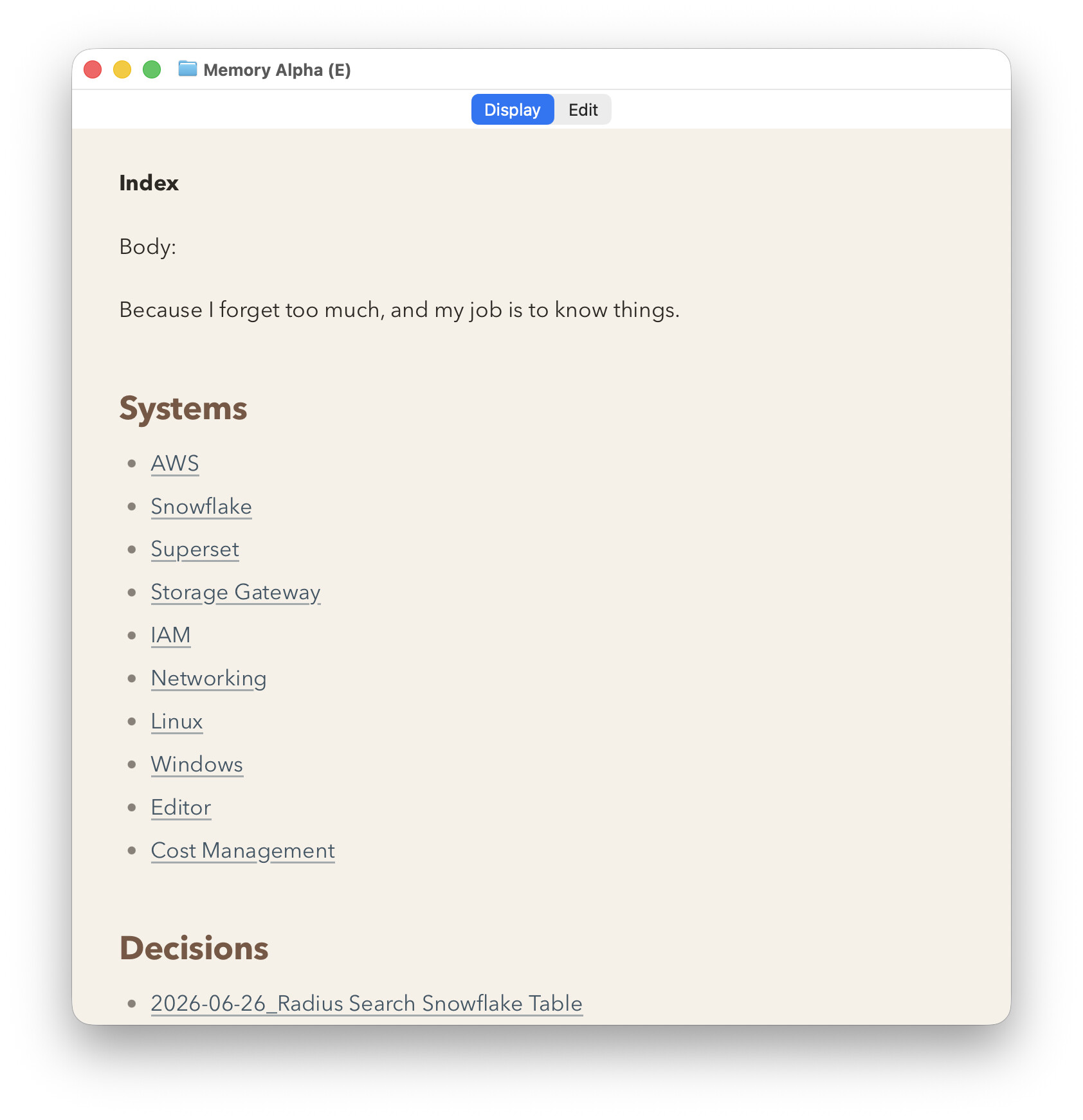
Couple other things, is there a way to hide the “Display-Edit” buttons? I like a minimal look most of the time, like this:
And I’d like to hide that edit button since I’m just going to use the keyboard commands to switch between them anyway.
Also, I have an icon, it’s not great, but the typewriter was for an app I made a long time ago and I commissioned an artist to make it for me. I’d be happy for you to use it if you wanted to. Orange might not be the best color for it honestly. The orange background I got from Github, and I put everything together in OmniGraffle. I’m not saying this is better than your icon! It’s just that I had this one and it’s not doing anything.
Check out the latest beta for a couple of quick changes. It should now let you turn off the alternating row colors on the List tab, and it has a keyboard shortcut (Shift-Cmd-H) to take you Home (meaning the top of the list).
Unfortunately, no, there’s currently no way to hide those, and I don’t see any reasonable way to make that possible without rearchitecting the whole UI. The tabs, for better or for worse, are baked in, so to speak.
I appreciate your generous offer to share your typewriter icon with me, and I do like it a lot (even the orange)! But I think I’ll decline, for several reasons:
To preserve visual continuity in branding;
Because I have had some positive feedback in the past specifically about the logo;
Because Apple keeps driving icon design in the direction of simple shapes, as opposed to detailed graphics;
Tahoe introduced some app icon complications, in terms of allowing the user to select between default (colored) icons, dark, clear and tinted. Getting one icon to look reasonable in all of these modes is a bit of a challenge (especially for someone like me, who is about as far away from a graphic designer as you can get), and I’m afraid if I try to wade into those waters again I’ll quickly end up over my head!
So while I’m sorely tempted, I don’t think I’ll take you up on the offer. But thanks, I appreciate the spirit of your offer!
 That’s exactly what I’m doing to open in BBEdit. However, I would say that if I have a longer document, and I’m trying to find a specific phrase in the document, it’d be nice to be able to see it in the preview right away. Just an idea.