This version takes a more modern (and less straightforward) approach to triggering the text editing of the template file. One advantage is that it should no longer block the main thread if it ends up in some sort of permanently waiting state (so no spinning beach ball). On the other hand, this new approach offers about a dozen configuration options, and I have no idea if they are now all optimized for this particular usage. Any and all testing will be appreciated!
Unfortunately I’m not getting the template file opened in the text editor.
Log window shows
iCloud Notenik Documents container available at /Users/malcolm/Library/Mobile Documents/iCloud~com~powersurgepub~notenik~shared/Documents? true
Initializing Collection
Collection: /Applications/Notenik.app/Contents/Resources/NotenikDocs/tips
25 Notes loaded for the Collection
Preferred Note File Format Presumed to be notenik
Initializing Collection
Collection: /Users/malcolm/Library/Mobile Documents/iCloud~com~powersurgepub~notenik~shared/Documents/Miscellany
2 Attachments loaded for the Collection
213 Notes loaded for the Collection
Mirroring Engaged
Preferred Note File Format Presumed to be notenik
Loading Shortcut of clients with path of file:///Users/malcolm/Library/Mobile%20Documents/iCloud~com~powersurgepub~notenik~shared/Documents/Clients/
Loading Shortcut of quotes with path of file:///Users/malcolm/Library/Mobile%20Documents/iCloud~com~powersurgepub~notenik~shared/Documents/Commonplace/
Loading Shortcut of qworks with path of file:///Users/malcolm/Library/Mobile%20Documents/iCloud~com~powersurgepub~notenik~shared/Documents/Commonplace/author-works/
Loading Shortcut of qauthors with path of file:///Users/malcolm/Library/Mobile%20Documents/iCloud~com~powersurgepub~notenik~shared/Documents/Commonplace/author-works/author-notes/
Loading Shortcut of jobticket with path of file:///Users/malcolm/Library/Mobile%20Documents/iCloud~com~powersurgepub~notenik~shared/Documents/Jobs/
Loading Shortcut of kadimaworknotes with path of file:///Users/malcolm/Library/Mobile%20Documents/iCloud~com~powersurgepub~notenik~shared/Documents/KadimaWorkNotes/
Loading Shortcut of todolist with path of file:///Users/malcolm/Library/Mobile%20Documents/iCloud~com~powersurgepub~notenik~shared/Documents/ToDoList/
Loading Shortcut of westwood with path of file:///Users/malcolm/Library/Mobile%20Documents/iCloud~com~powersurgepub~notenik~shared/Documents/WestwoodStreet/
Loading Shortcut of workrecords with path of file:///Users/malcolm/Library/Mobile%20Documents/iCloud~com~powersurgepub~notenik~shared/Documents/WorkRecords/
Attempting to text edit template URL of 'file:///Users/malcolm/Library/Mobile%20Documents/iCloud~com~powersurgepub~notenik~shared/Documents/Miscellany/template.md'
I guess the next test would be to temporarily change your default .md text editor to another app and see if that app opens the template file. I’m wondering if it’s a permissions issue…? You might try a new app that has broader permissions to read your disk files. Something like BBEdit…? The problem might be that when a file is opened in this way, it doesn’t pass your authorization to open along with it.
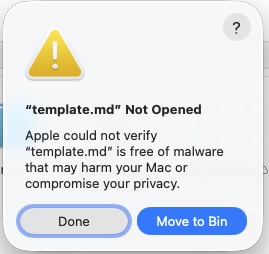
This warning has nothing to do with Notenik. The LibreOffice post is correct. The notice is shown because my default setup is to use MarkEdit for “.md” files. I had set this one to be opened by BBEdit for the experiment. That makes the OS suspicious. You can open the file with another app by right-clicking and using “Open With.” Having set the file to open with BBEdit when I double click to open it the warning is displayed.
Also, on the machine I’m using at work, MacBook Pro M5 Pro, there are no problems at all when opening a collection template.
It seems like the “cannot open template” problem is unique to my home setup.
Well, this little adventure has been helpful for me, since it’s caused me to redo the way I request the template file to be opened, so that it will no longer require Notenik to be force quit when something like this happens. Thanks for reporting and testing!